 Casino
  Promos
  Sign Up
  Search
 Discover
  All Games
 Download the Spinshark App and Play Spin Shark Casino on Mobile
The SpinShark app is available on Android and iOS devices, featuring games from top software providers in the United Kingdom. Our PWA is secured with the latest SSL encryption framework and anti-fraud systems. First-time players who download it, complete their registration process and make a deposit can claim our 150% matched bonus up to 900 GBP plus 150 free spins. Existing users at Spinshark UK can claim cashbacks and reload offers, such as the Fin-tastik Monday and the Sharkback Tuesday, right from mobile.
On this page, we’ll tell you more about how to install the SpinShark Casino app shortcut for your home screen and which devices it can work perfectly in sync with. Before we proceed, we will outline the Pros and Cons.
| Pros | Cons |
|---|---|
| Generous welcome bonus of 900 GBP plus 150 FS. | No app listings on the Play Store or Apple Store. |
| The app offers a quick download and registration process, usually under 3 minutes. | Mandatory KYC checks before first withdrawal. |
| Accept various currencies including GBP, EUR, USD, CAD, AUD, BTC, XRP, USDT, DOG, LTC and TRX. | Crypto withdrawals may depend on blockchain processing times. |
| Low minimum deposit of 20 GBP. | |
| Well-curated library from top gaming providers. |
How to Download SpinShark Casino Mobile App
We feature a PWA version for SpinShark app that can be installed on both Android and iOS devices. It offers full parity with our web platform, giving you instant access to all games and payment features. You’ll find the same intuitive layout you’re used to, now optimized for your mobile screen. Downloading our app doesn’t come with stringent requirements, and it can run with as little as 100MB storage space on any modern device (Android 7 or later and iOS 12 or later). In fact, all you need to download our app is a stable internet connection and a Chrome browser for Android devices and Safari for iOS devices.
How to Use and Install on Android
Installing our SpinShark app on your device takes less than 3 minutes, especially if you know the steps to follow. Before anything, the Chrome browser must be installed on your phone. If you have it, follow these easy steps.
- Click on the Browser Menu: On the Browser tab at the top of the screen, click on the menu icon, which is represented by three vertical dots.
- Select Add to Home Screen: From the list of options on the menu, choose ‘Add to Home Screen’.
- Install the App: A pop-up page will appear where you should click on install to get the application on your Android device.
After this, wait for a few seconds to download. Then head to your phone’s home screen and launch the SpinShark mobile app. The software size is around 445KB, and it requires 2GB of RAM to function properly.
How to Use and Install on iOS
Instead of the Chrome browser, what you need to download the SpinShark Casino app on your iPhone and iPad is the Safari browser. Follow these simple steps to complete the process in less than two minutes.
- Tap on the Share Icon: Locate the Share Icon at the bottom of your navigation panel, and then click on it to open your browser’s menu.
- Select Add to Home Screen: From the list of options on the menu, click on ‘Add to Home Screen.’
- Confirm your Selection: The final step is to confirm your choice by clicking on the ‘Add’ tab at the top of the page.
Available Devices Types for SpinShark Casino App
We optimized our casino app for each available mobile device. This means that the touch is responsive, and our games fill the screen during mobile gameplay. SpinShark mobile app versions have technical requirements for each of the device types, be it a phone, tablet or PC. The table below has more details:
| Parameters | PC – Webview | Tablets | Smartphone |
|---|---|---|---|
| Supported OS version | Windows, macOS, Chrome, Firefox, Edge and Safari | iPadOS, Android tablets | Android 7.0 and above, iOS 12.0 and above |
| Least Processor Requirement | Dual-core processor with a speed of at least 2.5 GHz | Snapdragon 680 or MediaTek Helio G99 | Quad-core 1.4 GHz |
| Ram | 4GB | 2GB | 2GB |
| Free Storage | 5 GB to 20 GB | 1GB | 100MB |
Interface
The SpinShark mobile app interface features a shark-themed layout with blue and black colours. It has a clear font with adverts on the main page inviting players to explore our welcome bonus, loyalty rewards and live casino. On the main page, we grouped our titles into various categories, including:
- Popular
- Spinshark’s Top 20
- New Games
- Trending
- The Live Lounge
- Fishing Games
The filter and search tools at the top allow for effortless navigation of our various game genres. The ‘Join Now’ and ‘Login’ tabs at the top make the registration and login process easy to follow. Just at the bottom, we have directory buttons that lead to different sections such as Casino, Promos, Sign Up, Search and Menu. Scrolling down to the bottom of the page, we have an FAQ section that answers most of the questions that pop up in the minds of SpinShark Casino mobile app users.
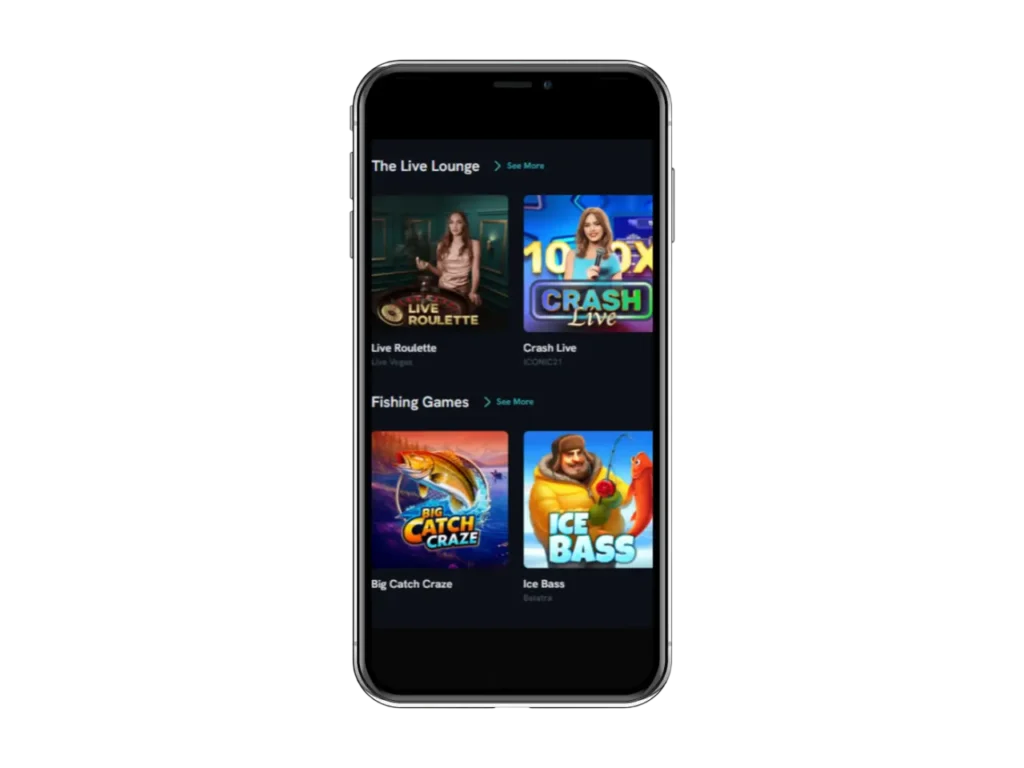
SpinShark Mobile App Version Games
We partner with 60+ world-class studios like NetEnt, Pragmatic Play and Yggdrasil to bring you the best in modern gaming. At the moment, slots dominate our library, but you will find other impressive titles in table games like Blackjack, Roulette, Baccarat, Poker, live dealer and exclusive releases. The RTPs for each of these games range between 95% to 99%, which are competitive figures in the market. Also, we use a fair RNG system for outcomes, verifiable by third-party platforms like eCOGRA and iTech Labs. The games are responsive; therefore, image quality won’t reduce across various screens.
Benefits of Mobile Playing
Flexibility and convenience are the two major benefits of playing on our mobiles. Our mobile outlets offer a rare kind of flexibility to play anytime and anywhere, eliminating the need to adhere to traditional casino operating hours. This gives users a greater experience as they play our games. SpinShark app features a PWA version that is easy to navigate and use. This allows it to provide instant entertainment even for players on a lunch break, commuting or simply relaxing at home.
Bonuses for SpinShark Mobile App Players
New UK players on our SpinShark Casino app can claim a welcome package of 150% matched deposit bonus up to 900 GBP plus 150 FS. The offer requires no bonus code and has a deposit limit of 20 GBP. Existing players, on the other hand, can join offers such as the following:
- The Bubbly Friday: Every Friday, players receive 60 FS when they make a minimum deposit of 30 GBP and enter the bonus code BUBBLE60.
- Fin-tastik Monday: Every Monday, players can collect a 50% matched deposit bonus up to 250 GBP + 30 FS.
- Sharkback Tuesday: Players can claim 10% cashback on any live game losses every Tuesday.
- Weekend with a Bite: Every weekend, players receive an 88% bonus up to 88 GBP with a deposit of 30 GBP when they enter the code BITE88.
- Baby Shark Sunday: Every Sunday, with a minimum deposit of 30 GBP, players receive 10 GBP when they enter the code BABY10.
Security and Data Protection
When using the SpinShark Casino mobile app, we collect and process your personal data for the purposes of managing your account. However, we ensure that any data collected is safe and secure through our advanced SSL encryption technology and anti-fraud systems. Also, UK players’ accounts can only be accessed with the player’s unique ID and password. They may also set up two-factor authentication (2FA) as additional protection from unauthorized use of their account.


